Sleepless keeps your MacBook awake with the lid closed, on battery, with no external display. One native menu-bar switch, with an auto-off timer and a battery-floor cutoff so you never drain it flat.
It holds one scoped sudo grant and runs your Mac unattended, so every release is built in the open and signed so you can prove what you ran.
gh attestation verify.SHA256SUMS. No Apple account needed to check.pmset flag.shasum -a 256 -c SHA256SUMS gh attestation verify Sleepless-1.2.0.zip -R Aboudjem/Sleepless
The one that actually does it
Most keep-awake apps ride on macOS power assertions. Assertions stop the idle timer, but they can't override the hardware lid-close trigger, so a closed lid still sleeps the Mac. Sleepless flips the one setting that can.
Power assertions (Caffeine, Theine, caffeinate) stop the idle timer, but not the lid-close trigger.
So a closed lid still sleeps the Mac, even with Amphetamine or KeepingYouAwake.
pmset disablesleep overrides lid-close sleep. Sleepless flips exactly that, reads it back, and adds safety nets.
“I will probably never support this option becausecaffeinatedoesn't support this. KYA usescaffeinateunder the hood.”KeepingYouAwake maintainer, issue #66
Small on purpose
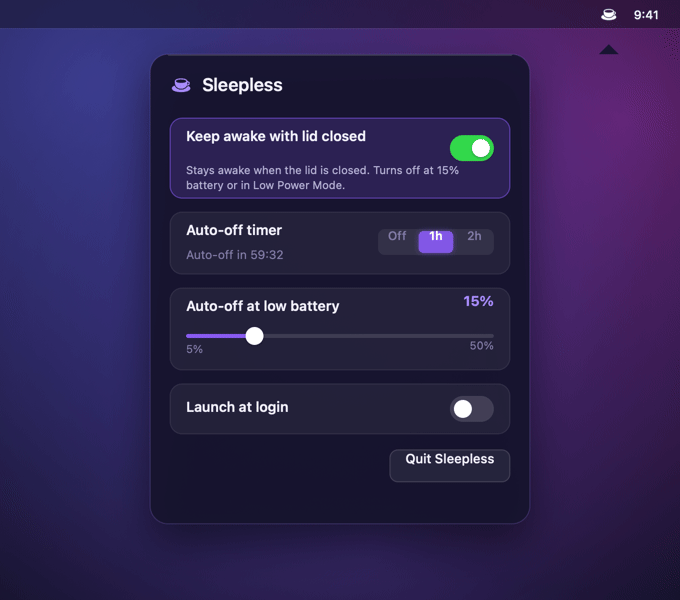
Click the coffee cup, flip the toggle. Empty cup is off, full cup is awake, full cup with a dot is awake on battery. The menu-bar glyph never lies about the real state.
Keep awake for 1 or 2 hours with a live countdown, then it turns itself off. In memory only.
Pick a floor from 5 to 50% (default 15%). On battery, it turns itself off before you run flat.
On battery, if Low Power Mode is on, Sleepless steps aside and lets the Mac sleep.
Just the lid closed, on battery. No external monitor, no dummy HDMI plug.
One AppKit file with SF Symbols. No Dock icon, no background daemon, no kext, no dependencies.
Menu-bar glyph: empty cup = off · full cup = awake · full cup + dot = awake on battery (auto-off live).
How it works
Sleepless toggles pmset disablesleep, which flips the kernel's SleepDisabled flag, then reverts it at your battery floor, in Low Power Mode, or when the timer ends. A reboot also resets it. Because a GUI app can't type a password, the installer adds a tightly scoped sudoers rule that permits exactly two commands and nothing else.
<you> ALL=(root) NOPASSWD: /usr/bin/pmset -a disablesleep 0, /usr/bin/pmset -a disablesleep 1
sudoers matches arguments literally with no wildcards, so any other command re-prompts for a password.
It calls Apple's /usr/bin/pmset directly with an argv array. No daemon, no shell, no helper script.
A reboot resets the flag, the floor and timer turn it off, and uninstall.sh removes the grant and proves it.
Releases ship SHA-256 sums and a Sigstore build-provenance attestation. No Apple account needed to check.
Full threat model and verification: SECURITY.md and AUDIT.md.
As of 2026-06
| Amphetamine | KeepingYouAwake | caffeinate | ||
|---|---|---|---|---|
| Awake, lid closed, no monitor | Yes ¹ | Flaky ² | No ³ | No |
| On battery | Yes | Yes | Lid open | Partial ⁴ |
| Auto-off timer | Yes | Yes | Yes | No |
| Auto-off on low battery | Yes | Yes | Yes | No |
| Open source | MIT | App Store | MIT | Apple |
| Cost | Free | Free | Free | Free |
¹ Sleepless uses pmset disablesleep, the mechanism built for lid-close, and reads the flag back so the UI reflects reality; behavior on any keep-awake tool is hardware and macOS-version dependent. ² Amphetamine documents closed-display mode but is widely reported to fail on Apple Silicon when the power source changes (Amphetamine-Enhancer #28); the app itself is closed source. ³ KeepingYouAwake cannot keep the lid closed by design, since it wraps caffeinate (issue #66). ⁴ caffeinate -i runs on battery; -s is AC-only.
Questions
Install Sleepless, click the coffee cup in the menu bar, flip the switch on, and close the lid (the laptop screen, also called the flap). It keeps the Mac awake on battery with no external display, using pmset disablesleep. No dummy HDMI plug or clamshell adapter is needed.
Those tools are built on macOS power assertions, which stop the idle timer but cannot override the hardware lid-close trigger. KeepingYouAwake wraps caffeinate, which its maintainer confirms cannot do lid-close. pmset disablesleep, which Sleepless uses, is a lower-level setting that can.
Yes. pmset -a disablesleep 1 sets the kernel's SleepDisabled flag on Apple Silicon, confirmed firsthand on macOS 26.3, which keeps a MacBook awake with the lid closed on battery. Apple does not officially document the setting, so verify it with pmset -g | grep SleepDisabled. Most claims that it stopped working describe caffeinate, a different mechanism.
It is safe for light, unattended work like downloads, syncs, or a hotspot. Heavy sustained load with the lid fully closed reduces airflow, so use judgement there. Sleepless turns itself off at the floor you set and in Low Power Mode, and the auto-off timer caps how long it stays on.
It needs one tightly scoped sudo grant (two exact pmset commands, nothing else) so a GUI app can flip the setting without a password prompt. There is no kernel extension and no background daemon. The whole app is a single AppKit file.
Yes. Switch Sleepless on, set a battery floor, close the lid, and an agent run, build, render, or training job keeps going. Plug in for an all-nighter, or stay on battery with a floor and timer so it stops itself before the battery runs low.

Install with Homebrew, or build it from source and read every line first.